
Register, Log In and Manage Your Tea Spins Account
Creating a personal account takes just a few minutes, and the whole process is designed to be as smooth as a well-brewed cup. Once you’re registered, you gain access to over 11,000 games, a generous welcome package, and a loyalty programme that keeps rewarding you the more you play. Our platform Tea Spins operates under a gaming licence and uses industry-standard encryption to keep your data and funds secure at all times.
How to Create Your Account in TeaSpins
Joining Tea Spins Casino is genuinely straightforward — there’s no lengthy form to fill out, and you won’t be asked for anything you don’t need to provide upfront. The sign-up process is built to get you inside the TeaSpins member account quickly, with only the essentials required at the point of registration.
To Register Your Account, Follow These Steps:
- Head to the main page of Tea Spins and click the SIGN UP button in the top navigation
- Complete the registration form with your name, email address, date of birth, and preferred currency
- Set a strong password and accept the terms and conditions
- Hit Create an Account — you’ll be redirected to the deposit page immediately
- Check your inbox for a welcome email confirming your registration
Once the form is submitted, you land straight on the deposit page, which means you can fund your casino account and start playing without unnecessary delays. Keep in mind that only one registration account per person is permitted on the platform — duplicate accounts are not allowed under the site’s fair-play policy.
Logging In and Account Access
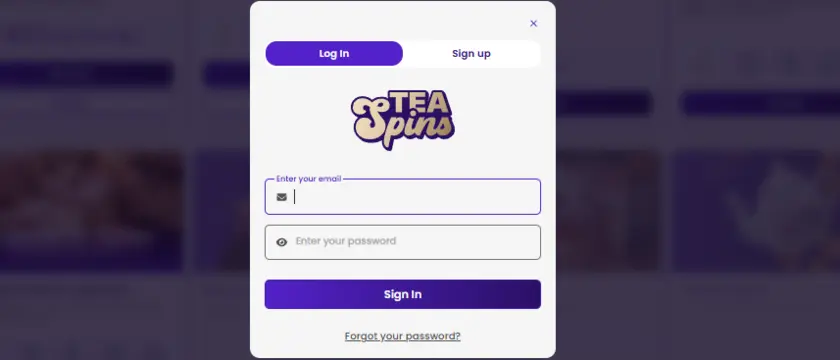
Returning to the casino is just as quick as signing up. The Tea Spins login button is prominently placed in the header on every page of the site, so you’ll never have to hunt for it. Simply click it, enter your registered email address and password, and you’re in.
If you ever forget your password, the page includes a dedicated Tea Spins password recovery option. Click the “Forgot Password” link, enter your email, and you’ll receive a reset link within minutes.
For added protection, we recommend enabling two-factor authentication from your account settings, which adds a second layer of identity confirmation each time you log in to your account. Your session in Tea Spins login is protected by SSL encryption, and inactivity timeouts help prevent unauthorised access if you step away from your device.
Verifying Your Account
Before your first withdrawal can be processed, TeaSpins requires all players to complete identity verification (KYC). This is standard practice for licensed online casinos and is in place to protect players and comply with anti-money laundering obligations. Understanding what’s available at each stage of your Tea Spins account access helps you plan your session from the start.
| Account Status | What’s Available | What’s Restricted |
| Registered, Unverified | Deposits, gameplay, bonuses | Withdrawals |
| Verification in Progress | Deposits, gameplay, bonuses | Withdrawals pending review |
| Fully Verified | All features, full cashout access | No restrictions |
| KYC Flagged / Additional Docs Requested | Deposits, gameplay | Withdrawals on hold until resolved |
We recommend completing verification early — before you request a cashout — so there are no delays when you’re ready to withdraw. You can submit your documents by logging in and navigating to the Documents page within your profile, where status updates appear in real time.
Bonuses After Sign-Up
New players at TeaSpins Casino are greeted with a welcome package worth up to £750 plus 100 Free Spins on your first deposit. The bonus is triggered by a minimum deposit of £20, and the match rate sits at 150% — meaning a £100 deposit becomes £250 in bonus funds. Free spins are delivered in five daily batches of 20 spins each, with winnings capped at £300 and a 40x wagering requirement applying to both the bonus and free spin proceeds within 10 days.
Beyond the welcome offer, Tea Spins Casino login also unlocks access to the Tea Spins member area — the platform’s multi-tier loyalty programme called The Tea Room. It spans seven levels from Bronze through to Diamond, and players earn Tea Leaves with every wager they place. As you climb tiers, perks include cashback deals, levelling bonuses, personalised promotions, faster withdrawals, birthday gifts, and at the Diamond tier, rewards worth up to £50,000. There’s no opt-in required; you’re automatically enrolled the moment your account is created.
Payment Methods for UK Players at TeaSpins
TeaSpins supports a broad range of deposit and withdrawal options tailored to UK players, covering both traditional card payments and a wide selection of cryptocurrencies. Deposits are credited almost instantly in most cases, while withdrawals are processed manually and typically completed within 24–72 hours once your account is fully verified.
Here Are the Main Payment Methods Available at Tea Spins Casino:
- Visa and Mastercard — standard debit and credit card options with fast processing
- Apple Pay and Google Pay — mobile wallet payments for quick, tap-style deposits
- Bank Wire — direct bank transfer, slightly longer processing time
- Bitcoin (BTC), Ethereum (ETH), Tether (USDT) — the most popular crypto options for fast deposits
- Litecoin (LTC), Ripple (XRP), Dogecoin (DOGE), Bitcoin Cash (BCH), TRON (TRX) — additional crypto methods visible in the cashier
The minimum deposit and withdrawal amount is generally £20, though this can vary depending on the payment method chosen. The full list of supported currencies — including GBP, EUR, and crypto equivalents — is available in the cashier section of your account.
Keeping Your Account Safe
Tea Spins secure account sessions are protected by 256-bit SSL encryption, which secures all data transmitted between your browser and the casino’s servers.
Practical Steps to Keep Your Account Safe:
- Use a unique, strong password that you don’t use on any other site
- Never share your login credentials with anyone
- Log out of your account when using shared or public devices
- Only submit documents through the official Documents section in your profile
Two-factor authentication (2FA) is available and strongly encouraged.
FAQ
How Do I Verify My Account at TeaSpins Casino?
Log in and go to the Documents page in your profile. From there, upload the required files — proof of identity, proof of address, and a screenshot of your payment method.
What Should I Do if I’ve Forgotten My Tea Spins Password?
Click the TeaSpins login page button on the homepage, then select the “Forgot Password” option. Enter the email address linked to your account and you’ll receive a reset link shortly.
Can I Access Tea Spins on Mobile Without an App?
Yes — the website is fully optimised for mobile browsers. Simply open teaspin.com on your smartphone or tablet.
What Happens if I Try to Open More Than One Account?
The platform allows only one registered account per person. Creating duplicate accounts may result in account suspension and forfeiture of balances.
Can I Use a VPN to Access My Account?
Using a VPN is not recommended and may be flagged by the platform’s security systems, potentially leading to temporary account restrictions.